
Logs
Content: logs_en.txtThe LOGS section of PLUS23.CYBER.SECURITY provides a central overview of security-related events, activities and analysis data of your protected online systems.
The various LOG sections help you to identify and analyze suspicious access attempts, technical anomalies, security events and administrative changes more quickly and effectively.
This includes, among other things:
- Activity and configuration changes
- Live traffic and visitor analysis
- Scanner and bruteforce activities
- Signature and security checks
- Technical analysis and debug information
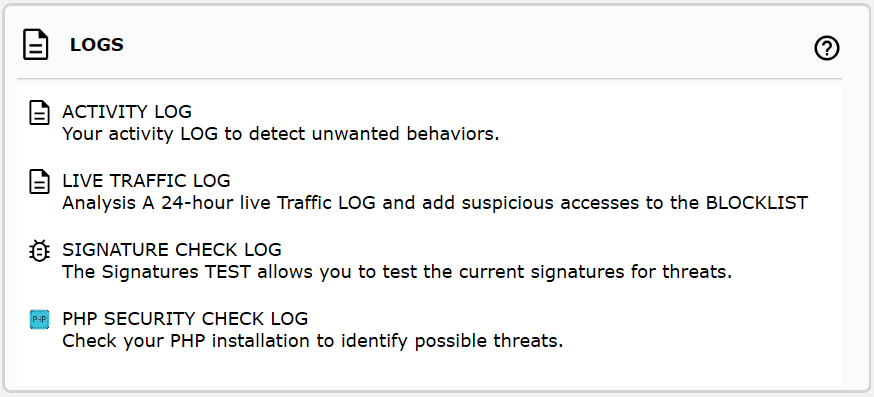
NOTICE: The previous PHP SECURITY CHECK LOG has been integrated into the SECURITY REPORT section.
ACTIVITY LOG
The ACTIVITY LOG
documents security-related settings,
configuration changes
and administrative operations
of your domain.
This includes changes to:
- Security rules
- Allowlists and blocklists
- Protection mechanisms
- Configuration and system values
Different time periods can be selected for analysis and events can be filtered specifically.
The LOG data is stored directly within your domain. Access by the PLUS23 team only occurs if you voluntarily provide us with a corresponding ANALYSIS FILE.
LIVE TRAFFIC LOG
The LIVE TRAFFIC LOG
documents visitor access,
network activities
and technical request information
from the last 5 months.
The function can be activated via
DashBoard::Domains.
The overview groups requests
by countries,
IP addresses
and network structures.
In addition,
remote IP addresses
can be further analyzed directly
using the integrated
Guard.Framework IP-LOOKUP.
This includes for example:
- Known security events
- Header anomalies
- Suspicious network access
- Unusual request patterns
SPECIAL FEATURE: Automatically blocked scanner or file-scanning attacks are not additionally stored within the LIVE TRAFFIC LOG, since these are already documented separately in the DashBoard::Security Report.
For each request, it can individually be decided whether corresponding events should directly be added to the BLOCKLIST. Marked events can additionally be copied to the clipboard and externally processed.
SIGNATURE CHECK LOG
The SIGNATURE CHECK LOG
displays which security signatures
and protection rules
are triggered
by specific requests or inputs.
The analysis data may originate from:
- Existing security events
- LIVE TRAFFIC entries
- IP addresses
- Hosts
- User agents
- Referrers
In case of unwanted events, corresponding matches can directly be added to the allowlist.
Individual signature contents or analysis results can additionally be copied to the clipboard.
The following illustration exemplarily shows the detection result of a SQL injection request:

If you identify self-researched entries that you believe should be included in future security signatures, we appreciate a corresponding report through support.
PHP SECURITY CHECK LOG
The PHP SECURITY CHECK
reviews security-related PHP functions,
system commands
and potentially critical server configurations.
The evaluation
has been integrated
into the
SECURITY REPORT section.
The analysis includes, among other things:
- System and shell commands
- PHP code execution
- Filesystem functions
- Information and debug functions
- Additional security-related PHP modules
Suspicious or enabled functions are marked accordingly and documented with additional information.
For many functions, additional notes and references to the official PHP documentation are available.
To restrict specific PHP functions, the disable_functions entry inside the php.ini can for example be used.
Example: disable_functions=exec,passthru,system,shell_exec,popen,proc_open,pcntl_exec
NOTICE: Changes to PHP security functions should always be reviewed carefully, since certain applications or plugins may depend on individual functions.
After modifications, a complete functionality test of your systems and applications is recommended.